
CarRentals.com
Competitive Analysis
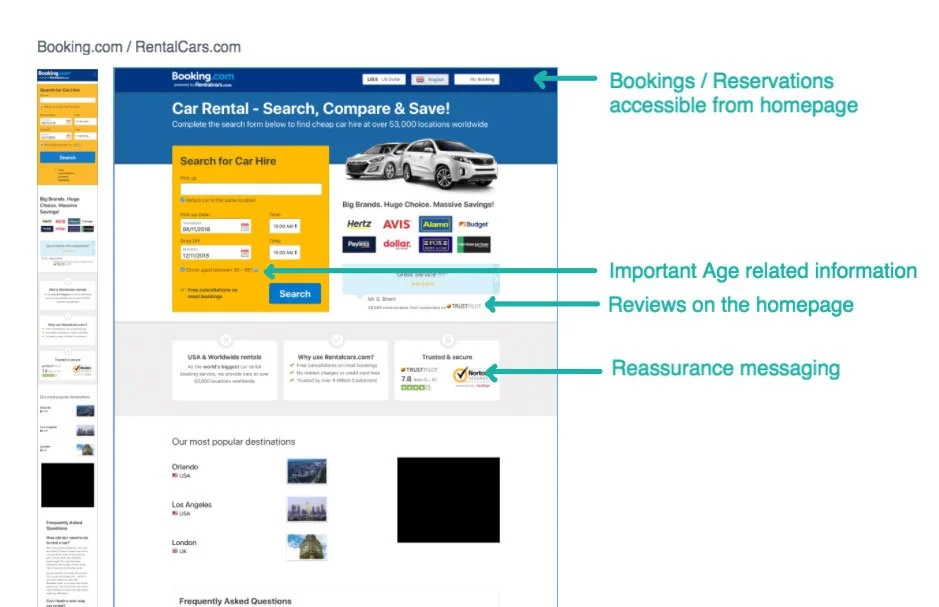
I went through CarRentals.com and captured screenshots of different points in the customer experience, then reviewed competitor sites and did the same. I grouped comparable experiences together so I could identify patterns, highlight approaches that worked well, and use them as a benchmark for evaluating the CarRentals.com experience.
Document key moments across the existing CarRentals.com customer experience.
Capture comparable experiences from competitor sites and note approaches that worked well.
Place similar experiences side by side to make differences in messaging, hierarchy and functionality easier to evaluate.
Use the strongest patterns as reference points when identifying gaps and opportunities within CarRentals.com.
Direct Comparisons
Existing bookings were easier to access directly from the homepage.
Confidence-building information was surfaced earlier in the experience.
Reviews were used as part of the decision-making experience.
Key information was given stronger hierarchy and made easier to scan.
Booking management required additional navigation and used inconsistent terminology.
Opportunities existed to build more confidence throughout the booking experience.
Customer reviews were not surfaced prominently where they could support booking decisions.
Important information could be difficult to distinguish from surrounding content.
Site Audit
Using the competitive analysis as a benchmark, I reviewed the existing CarRentals.com experience for usability issues, inconsistencies, missing functionality and opportunities to make the experience easier to understand and navigate.
- Consistent tone / messaging to customers
- Better urgency messaging / confidence messaging
- Clearer / more scannable information
- Clearer / better visual hierarchy of information
- Promotional / inspirational content
- Better location / product specific experiences
- Consistency of visual language elements
Additional Audit Findings
- Clicking Sign In took users to the “Manage Your Reservations” experience instead of directly to a sign-in page.
- After signing in, users remained on Manage Your Reservations rather than being taken to My Bookings or Account.
- FAQ improvements were identified as an opportunity to better support customers.
- Supplier pages reached through Get Deals did not automatically pre-filter search results to the selected supplier.
- Sign In and Menu treatments were presented differently across pages.
- “Find a Booking” and “Manage Your Reservations” were used for the same experience.
- Link treatments were not consistently applied throughout the site.
- Pagination styles varied between different parts of the experience.
- Desktop used a compact numerical date format while mobile used a substantially longer written-out format.
- Longer mobile date strings could prevent users from seeing whether a selected time was AM or PM.
- Active-filter text on mobile could become difficult to read against the darker selected-filter background.
- Pagination arrow alignment needed additional refinement.
- Directional arrows were not consistently vertically centered.
- Icon spacing could be tightened so icons related more clearly to their accompanying text.
- The interface used a large number of very similar gray values across backgrounds, copy, navigation and supporting UI.
Revenue Opportunities
From the site audit, I identified and prioritized the opportunities that I thought had the strongest potential to support revenue while also improving the customer experience.
- Better use of urgency messaging
- Make urgency messaging more noticeable
- Make the benefits of booking with CarRentals.com easier to understand
- Payment Options & Pay Now Special
- Clarify financial responsibility and rental coverage
- Bring destination deals and promotional content onto the site
Payment Options & Pay Now Special
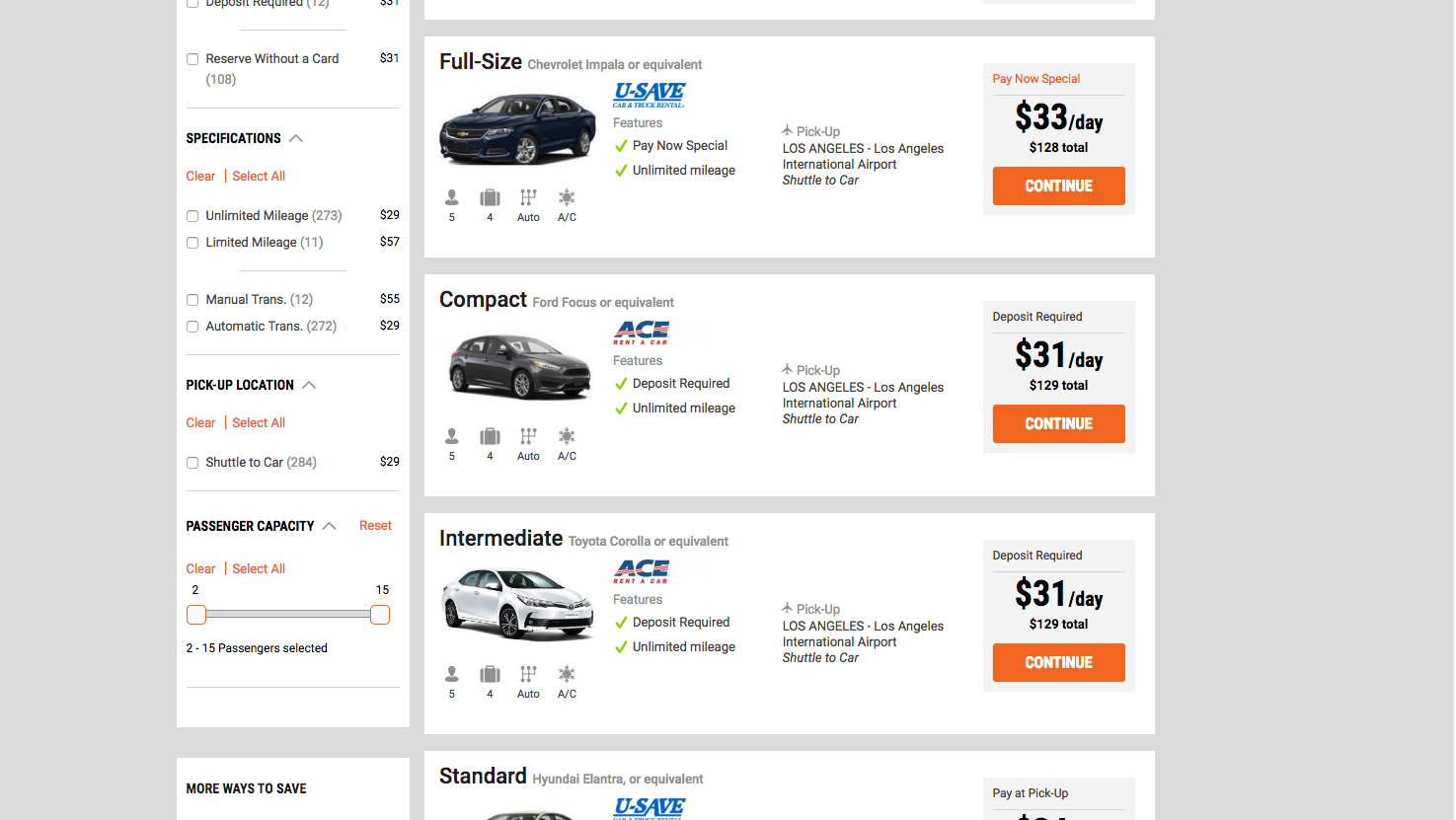
Currently the Pay Now Special gets lost in the results page with the rest of the boxes all having text in the same spot.
Bring the payment options filter to the very top.
Bring the payment options filter to the very top and add a small explanation box.
Differentiate between Pay Now, Reserve with Card, Pay Later, and Reserve without Card using flags on the search results.
Redefine so that only the cars with a pay now option and a 10 to 15% discount flag as “Pay Now Special” to entice users to gravitate towards those good savings.
It isn’t clear for new customers that you can reserve cars without using a credit card. You can have the first 10–15 results be prepaid options.
If the payment options are clearer, customers will better understand their choices and have an easier booking experience. These designs went into A/B tests to find out.
Design Explorations
I explored several ways to make payment choices easier to understand throughout the booking experience, from search-result filters and “Pay Now Special” treatments to clearer payment requirements after selecting a vehicle.
Localization Considerations
The search-results treatment also needed to support the additional languages used across the product, so I reviewed the layout using English, French, and German versions.